
Is GPT-6 Astra actually good for 3D modeling?
AI is getting surprisingly good at creating 3D models from images, floor plans, and text prompts. GPT-6 Astra is one of the most hyped models in this space, promising to turn references into usable SketchUp and Blender files. But does it actually save time for real projects—or is it still faster to model things yourself?
Let’s walk through six different tests, from apartments to products, to see where GPT-6 Astra is genuinely useful and where it still falls short.
How GPT-6 Astra was tested
The tests focused on practical 3D work, not just pretty AI renders. The idea was simple: give GPT-6 Astra real references and see what kind of 3D files it produces, then judge them as if they were part of a real workflow.
The setup used:
• SketchUp models generated via ChatGPT, using uploaded floor plans.
• Blender models generated via the Higgsfield (Higgs Field) plugin with GPT-6 Astra.
• Reference inputs like floor plans, elevations, product photos, dimensions, and finished project photos.
• Final previews and tests in rendering tools like Lumion.
If you want more context on Astra itself and how it fits into the latest generation of multimodal models, you can also look at this overview of GPT‑6 Astra and other recent AI updates and this deeper dive into OpenAI’s Astra model.
Test 1: A small apartment in SketchUp
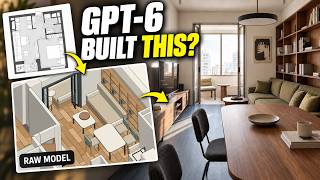
The first test was a compact one-bedroom apartment. The floor plan was uploaded and GPT-6 Astra was asked to create a fully editable SketchUp model with:
• Accurate dimensions
• Correct proportions
• Furniture included
After about 27 minutes, Astra returned a SketchUp file plus overview and top-view images.
At a glance, the result looked promising: the layout was close to the reference, the scale felt reasonable, and the apartment was clearly recognizable.
But once you looked closer, the limitations appeared:
• Furniture was extremely basic—just simple placeholder shapes.
• Many items would need to be replaced before using the model in a real project.
• Some details were off and required manual correction.
One nice surprise: the floorboards were modeled individually with separate materials, adding a good level of detail. But that detail didn’t compensate for the inaccuracies elsewhere.
With better lighting and quick tweaks in tools like Lumion, the scene already looked convincing enough for early-stage design. Still, the key question remains: does waiting nearly half an hour, then fixing and replacing elements, really save time compared to blocking out the space manually?
Test 2: A foldable phone product model in Blender
Next up was a product: the fictional iPhone Duo foldable phone. This test leaned into Astra’s potential for product design and visualization.
The inputs included:
• A reference image of the phone
• A second image with key measurements
• A more detailed modeling prompt generated by ChatGPT from those references
GPT-6 Astra, running on Higgsfield’s infrastructure, took about 54 minutes to produce a Blender model.
The result:
• The overall shape and proportions were decent.
• From certain angles, the renders looked quite convincing.
• But there were major issues: the hinge wasn’t accurate, and the camera side was swapped with the screen side.
Those are not small tweaks—they’re structural changes that require real work to fix after almost an hour of generation.
On the positive side, the model was built from separate parts. Each component could be selected, moved, and animated independently, which is very helpful for exploded views or product animations. That modular structure makes the output more usable than a single fused mesh.
Still, for final product renders, the details would need to match the reference much more closely. Considering the 54-minute wait and the corrections needed, this test ended up as a mixed result.
Test 3: A full building from plans and photos
The third test scaled things up: a real building from ArchDaily, complete with floor plans, elevations, and a photo of the finished project.
This time, the model was generated directly in Blender with the Higgsfield plugin, using:
• Floor plans
• Elevations
• A photo of the built project as a visual guide
This was one of Astra’s most convincing outputs:
• The overall form closely matched the real building.
• There was a good amount of architectural detail.
• Even elements like a tree from the reference photo were included.
Having multiple types of references clearly helped. With plans, elevations, and a photo, Astra had more constraints and context, and it showed in the result.
The building model was then used as a base for image and video generation, including a timelapse-style animation. While the animation itself is separate from the underlying geometry, it demonstrates how an AI-generated model can quickly become the foundation for presentations and concept visuals.
Test 4: An IKEA vase that just works
After the building, the next test went smaller and more focused: an IKEA vase with a simple but detailed-enough shape.
The reference included product images and dimensions, and Astra was asked to build the vase directly in Blender.
This was one of the strongest results:
• Dimensions matched well.
• The overall shape was accurate.
• The small details were captured correctly.
No obvious structural problems stood out, unlike in earlier tests. For this particular object, Astra essentially nailed it.
The vase was then taken further:
• Rendered as a studio-style product shot.
• Animated for a more polished product presentation.
• Even 3D printed as a quick physical test, which turned out well.
This is exactly the kind of use case where GPT-6 Astra feels genuinely helpful: a relatively simple, well-defined object with clear references and dimensions that you can quickly turn into a usable model and then into visuals or physical prototypes.
Test 5: A more complex IKEA chair
Next came an IKEA chair—more complex than the vase, with fabric, subtle bumps, curves, and metal fittings.
Again, Astra received reference images and measurements, then generated a Blender model.
The result was underwhelming:
• The general shape and idea of the chair were there.
• But many of the details that give the real chair its character were missing.
• The upholstered seat and back were too simple and lacked the nuanced form of the original.
The base structure underneath, however, was better. The metal frame and overall support looked usable and could be worth keeping as a starting point.
This test showed how quickly the quality drops once the object becomes more intricate. As soon as there are complex surfaces, fabric behavior, and subtle design cues, Astra’s output becomes more of a rough draft than a production-ready asset.
Test 6: Rebuilding a known apartment project
The final test went back to familiar territory: an apartment project that had already been modeled and rendered manually in the past. That made it easy to compare what Astra produced against a known “correct” version.
The input this time was just the floor plan, and GPT-6 Astra (via Higgsfield) was asked to build the model.
The main issues:
• The same basic, low-detail furniture problem reappeared.
• The layout had mistakes: an extra door was added, and the toilet was placed facing the wrong wall.
• Even after trying to strip out the furniture, the model still needed cleanup.
Because only the floor plan was provided, Astra had less information, and it showed. But in a real workflow, these are exactly the kinds of errors you have to hunt down and fix yourself.
At that point, you have to ask: if it takes 20+ minutes to generate the walls and layout, and then more time to correct them, is that actually faster than drawing the walls manually and knowing they’re right from the start?
Where GPT-6 Astra is genuinely useful
Across all six tests, a pattern emerges. GPT-6 Astra is most useful when:
• The object is relatively simple but still has enough detail to be annoying to model by hand (like the vase).
• You have good reference material: photos, dimensions, and ideally multiple views or drawings.
• You plan to use the output as a starting point, not as a final production-ready model.
Specific strengths include:
• Quickly generating base geometry for products and small objects.
• Creating building massing and early-stage architecture from plans and photos.
• Producing separate, editable parts in Blender that can be animated or rearranged.
Where Astra still falls short
On the other hand, GPT-6 Astra struggles when:
• The object has complex materials, fabrics, or subtle curves (like the chair).
• Layout accuracy is critical and references are limited (like the apartments).
• You need something you can trust immediately for final renders or documentation.
The biggest takeaway is this: a good-looking render does not mean the underlying model is good.
To actually use an AI-generated model in production, you still need to:
• Open the file and inspect the geometry.
• Check dimensions and proportions.
• Verify details like openings, fixtures, and alignment.
• Count the time you spend fixing and replacing elements.
How it fits into a real 3D workflow
For many 3D artists, architects, and product designers, the key metric is not how impressive the AI demo looks, but how long it takes to reach a model you can trust.
Based on these tests, GPT-6 Astra currently makes the most sense for:
• Selected objects within a larger scene (vases, props, simple furniture bases).
• Early versions of spaces and buildings where you expect to refine the design anyway.
• Concept presentations, animations, and quick visualizations built on top of an AI-generated base.
It’s not yet at the point where you can hand it a floor plan or product photo and rely on the output as a finished, error-free model.
Should you use GPT-6 Astra for 3D modeling?
If you’re curious about AI-assisted 3D, GPT-6 Astra is worth experimenting with—especially for simpler objects and early-stage ideas. It can absolutely save time in specific cases, and some results (like the vase and the building) are strong enough to build on.
But for now, you should still treat Astra as a smart assistant, not a replacement for your modeling skills. Expect to:
• Use it for drafts and starting points.
• Spend time reviewing and correcting its work.
• Decide case by case whether it’s faster than just modeling from scratch.
The technology is moving quickly, and Astra is already a big step toward AI-native 3D workflows. For production work, though, human control and verification are still essential.









Comments
No comments yet. Be the first to share your thoughts!