
I tried making a viral video using only Claude AI
Creating animated short videos that look like they took hours to produce no longer requires complex software or editing skills. With a single Claude skill and an AI voice generator, you can go from a blank page to a fully rendered MP4 that’s ready to upload to YouTube Shorts, TikTok, or Reels.
How this Claude animation workflow works
The core idea is simple: instead of juggling multiple tools for scripting, storyboarding, and animation, you let Claude handle almost everything through a custom skill. Your main jobs are to pick a story, generate a voice-over, and upload the audio back into Claude. From there, Claude generates all the frames and assembles the final video for you.
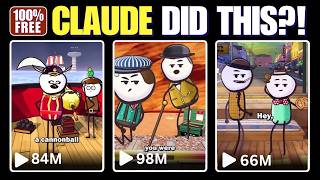
This workflow was inspired by the kind of short, highly engaging animated clips that regularly pull in millions of views. The twist is that you don’t need Blender, CapCut, or a traditional video editor to replicate that style.
Step 1: Install the custom Claude skill
The entire process starts with a special Claude skill file that defines how Claude should guide you, structure the story, and build the animation. Once you have the file downloaded, adding it to Claude is straightforward.
Open Claude and go to the customization area. Under the skills section, choose the option to add a new skill, then upload the skill file from your device. After the upload finishes, save it so it’s available whenever you start a new chat. There’s no coding, no manual configuration, and no need to build your own prompt system from scratch.
Step 2: Start an animated video project in Claude
With the skill installed, head back to the Claude home screen. Start a new conversation and select the skill you just added, often labeled something like “cartoon audio short.”
You don’t need to write a long prompt. Just activate the skill and submit. Claude will begin by asking a few simple questions to understand what you want to create and where in the process you’re starting.
Step 3: Choose whether to start from audio or from scratch
Claude’s first key question is: do you already have a voice-over, or do you want Claude to help you create everything from scratch?
If you already have an audio file, you can skip ahead and focus on animation. But if you’re starting with nothing—no idea, no script—choose the option that says you need ideas and a script. This is where the skill really shines, because it’s designed to generate short, bingeable stories that work well as animated shorts.
Claude will also ask how long you want the video to be. A 20–30 second duration is a great starting point, especially for platforms that reward quick, punchy content. The final video may run slightly longer depending on the pacing of the script and voice-over.
Step 4: Generate a viral-friendly story idea
Once you’ve chosen your duration, Claude will generate around ten original story ideas tailored for animated shorts. These are designed with virality in mind: strong hooks, curiosity, and unusual or surprising concepts that make people want to watch until the end.
Examples include wild historical scams, bizarre facts, or unexpected twists—like the story of the con artist who managed to sell the Eiffel Tower for scrap metal not once, but twice. Stories like that are perfect for short-form content because they’re instantly intriguing and easy to follow.
Pick the idea you like best by entering its number. Claude will then expand that concept into a full voice-over script.
Step 5: Let Claude write the complete script
After you select a story idea, Claude generates the full narration script for your video. The skill is tuned to follow a proven storytelling pattern:
- A strong opening hook that grabs attention in the first few seconds
- Engaging middle beats that build curiosity and tension
- A satisfying or surprising ending that rewards viewers for watching
You can review the script and tweak any lines you don’t like, or simply copy it as is. Once you’re happy, it’s time to turn that script into audio.
Step 6: Generate a natural-sounding voice-over
To create the narration, you’ll use an AI text-to-speech tool. The workflow in the transcript uses 11Labs, but any high-quality AI voice generator will work.
Paste your script into the voice tool, pick a voice that matches your style—serious, dramatic, casual, or storyteller—and generate the audio. Listen through once to make sure the pacing and pronunciation feel right. If needed, you can adjust the script slightly and regenerate.
When you’re satisfied, download the audio file (usually as an MP3 or WAV). This file is what Claude will use to sync the animation.
Step 7: Upload your audio and let Claude animate everything
Go back to your Claude chat where the skill is still active. Upload the voice-over file you just created and submit it. This is the final piece Claude needs to start building the animation.
From here, the skill takes over and runs the heavy-lift process:
- Analyzing the audio and script timing
- Generating visual frames that match the story beats
- Rendering hundreds or even thousands of frames
- Combining everything into a single MP4 video with your narration
This step can take a while. For a 20–30 second short, expect something like 30 minutes of processing time, depending on the complexity and the number of frames. During the process, Claude can show you the individual frames it’s generating so you can see the style and progression before the final render is done.
What the final result looks like
Once Claude finishes rendering, you’ll receive a downloadable MP4 file with your voice-over synced to a fully animated sequence. The look is similar to the viral, minimalist cartoon-style shorts that dominate platforms like YouTube Shorts and TikTok.
For example, using the Eiffel Tower scam story, the finished video walks viewers through how Victor Lustig forged government papers, invited scrap dealers to a luxury hotel, convinced one to pay for the tower, disappeared, and then came back to pull off the same scam again—all visualized as a simple but engaging animation.
From your perspective, the workflow was straightforward: choose a story, approve the script, generate a voice-over, upload the audio, and wait for Claude to do the rest.
Repeat the process for daily content
One of the biggest advantages of this setup is how easy it is to repeat. Once your skill is installed and you’re comfortable with the steps, you can create new animated shorts daily:
- Open Claude and start a new session with the animation skill
- Generate a fresh story idea and script
- Create a new voice-over with your AI audio tool
- Upload the audio to Claude and let it render the animation
If you want to dive deeper into optimizing stories and hooks for social platforms, you may also find it helpful to pair this workflow with strategies from guides like how to make viral Instagram Reels using Claude step by step.
Free vs paid Claude usage considerations
One open question is how reliably this workflow runs on Claude’s free plan. Because rendering animations and processing long audio files can be resource-intensive, you might hit usage limits and be forced to wait several hours before continuing.
If you’re experimenting or creating just a few videos, the free tier might be enough, even with occasional pauses. For more consistent daily output, a paid plan will likely provide a smoother experience with fewer interruptions.
If you’re interested in building a broader AI-powered content stack around this, including monetization angles, you might also want to look at experiments like using AI tools that can actually make you money.
Why this approach is so powerful
This workflow lowers the barrier to entry for animated content in a few key ways:
- No traditional editing tools: You don’t need Blender, After Effects, CapCut, or any advanced video editor.
- No design or animation skills: Claude handles the frame generation and visual style for you.
- Simple, repeatable process: Once set up, you can go from idea to finished video with the same few steps every time.
- Optimized storytelling: The skill is tuned for short-form, hook-driven stories that keep viewers watching.
If you’ve wanted to tap into the world of faceless, animated shorts but felt blocked by the technical side, using Claude as your central animation engine is one of the easiest ways to get started.
Final thoughts
With a single Claude skill and an AI voice generator, you can produce animated videos that look surprisingly polished for the amount of effort required. The process is accessible enough that even beginners can follow it: install the skill, generate a story and script, create a voice-over, upload the audio, and let Claude do the rest.
From there, it’s all about consistency—publishing regularly, testing different story angles, and iterating on what performs best. In a landscape where short-form content can reach millions of people overnight, having an AI workflow like this in your toolkit is a serious advantage.








Comments